Why alerts may not ring on time
Android may delay or block alarms when notifications are disabled, exact alarm access is restricted, full-screen alarms are not allowed, or battery optimization stops background work.
Important reminders need Android notification settings to be ready. RemindQuick helps you check permission, exact alarms, full-screen alarms, and battery restrictions.
Download RemindQuick on Google Play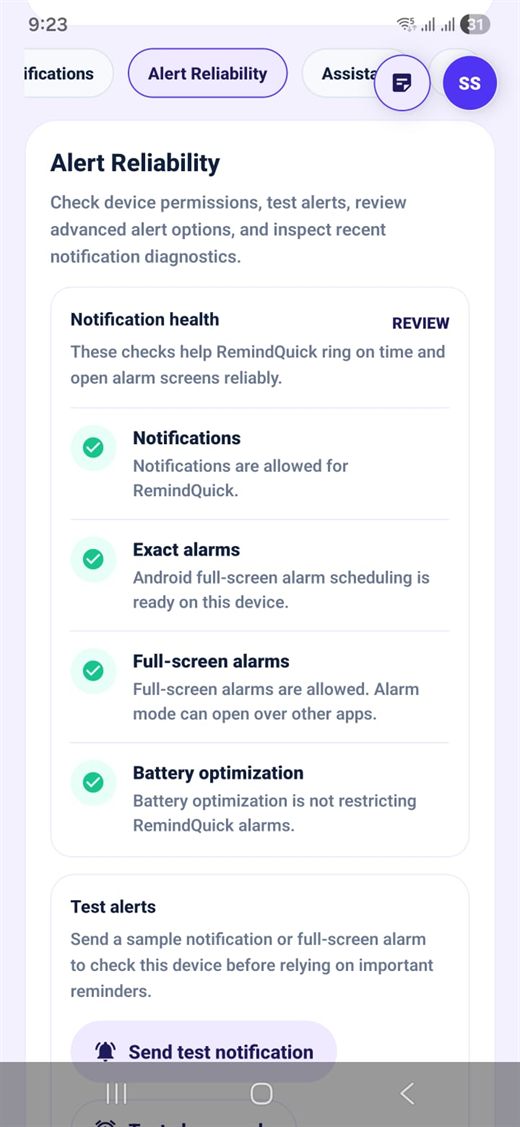
Android may delay or block alarms when notifications are disabled, exact alarm access is restricted, full-screen alarms are not allowed, or battery optimization stops background work.
The Alert Reliability screen helps users review notification health, send test alerts, and confirm that important reminders can open alarm screens reliably.
Use these checks before relying on medicine reminders, payment reminders, meeting alerts, wake-up style reminders, travel reminders, or caregiver reminders.
These settings help RemindQuick show reminders on time and reduce the chance that Android delays or blocks important alerts.