Bring your own AI provider
Use OpenAI, Groq, OpenRouter, or another chat-completions compatible endpoint when you prefer your own API key or model.
RemindQuick lets advanced users connect an OpenAI-compatible chat completions endpoint for AI-assisted reminder creation.
Download RemindQuick on Google Play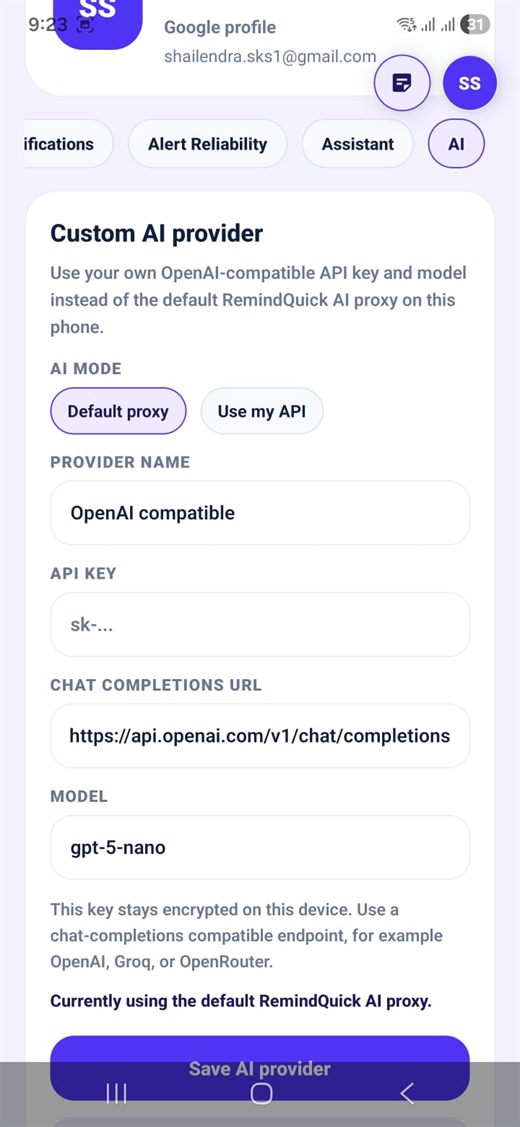
Use OpenAI, Groq, OpenRouter, or another chat-completions compatible endpoint when you prefer your own API key or model.
Enter provider name, API key, chat completions URL, and model name. This gives advanced users more flexibility for AI reminder parsing.
Your key stays encrypted on the phone. RemindQuick uses it to help parse natural language, voice reminders, categories, repeat schedules, and notes.
Yes. RemindQuick supports custom AI provider settings with an API key, chat completions URL, provider name, and model name.